
You are using an out of date browser. It may not display this or other websites correctly.
You should upgrade or use an alternative browser.
You should upgrade or use an alternative browser.
How-to & Troubleshooting Thread
- Thread starter TruckDriver9
- Start date

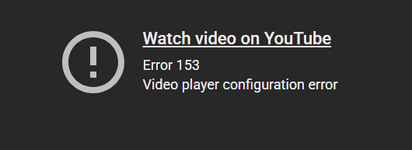
Suddenly a few weeks ago, Youtube links won't play for me embedded in the forum when I'm on my Windows 10 desktop, but still no problem on my Android phone. I run the same VPN on both. The thumbnail changes to this error message.
Any ideas?
Any ideas?

We had a fix for this so a search for Australia also return results Australian (since Australia is part of Australian), but somebody complained and the fix was reverted.
Lol! I was one of the people who complained because the fix had removed the ability to search only within a particular thread.
The irony!
I see that some posters still have trouble distinguishing between the quick search, the old advanced search, and the new advanced search.
The quick search can be accessed by simply clicking the icon in the top-right corner. This will open the following box:
The quick search can be accessed by simply clicking the icon in the top-right corner. This will open the following box:

This can be used to search within a specific thread for posts by a particular user, in this example, Samseau. When we click on the advanced search option (which I circled in red), it will bring up the old advanced search feature:
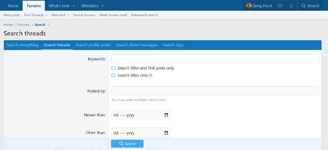
However, the old advanced search and the new advanced search are different. To access the new advanced search, do not click the top-right icon. Instead, open the Forums dropdown and select Advanced Search from there.

This will bring up the new advanced search that was implemented earlier:
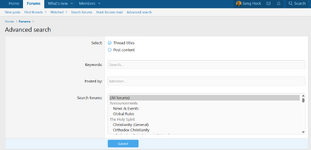
Alternatively, you can access the new advanced search by typing this URL directly:


I have updated the add-on which is responsible for this functionality. Please let me know if there is any improvement.Suddenly a few weeks ago, Youtube links won't play for me embedded in the forum when I'm on my Windows 10 desktop, but still no problem on my Android phone. I run the same VPN on both. The thumbnail changes to this error message.
View attachment 26095
Any ideas?
Anybody else having problems with the scrolling mechanism locking up when attempting to scroll up and down inside a thread? It's only happening for me inside threads, but doesn't happen on the homepage.
I dropped my phone pretty hard recently and cracked the screen and thought maybe it was my phone (also completely updated my phone and browser), but this scroll mechanism locking up doesn't happen on other much bigger sites like YouTube. Right now as a solution, when my screen freezes up I have to go back to homepage, re-enter the thread and immediately keep the page slowly scrolling with one finger constantly to keep the page from locking up. Annoying.
@Servant of Christ
I dropped my phone pretty hard recently and cracked the screen and thought maybe it was my phone (also completely updated my phone and browser), but this scroll mechanism locking up doesn't happen on other much bigger sites like YouTube. Right now as a solution, when my screen freezes up I have to go back to homepage, re-enter the thread and immediately keep the page slowly scrolling with one finger constantly to keep the page from locking up. Annoying.
@Servant of Christ
Last edited:

Your lost is all in hidden script. Has to be highlighted to read... Can you please edit for normal color.From DC's perspective this is all about China, it's about countering an ascending and increasingly hostile peer competitor in the US' main theater of operation - aka the Indo-Pacific. The current trajectory there is one of Washington's dominance and lead eroding leading to a potential US defeat. And if the US folds in the Indo-Pacific it will be the end of the USD and US Empire.
Despite their many miscalculations and mistakes the Chinese do play the long game and have been semi-competent at it. Beijing's greatest strength is its authoritian One Party State type of rule, its gigantic manufacturing base and it's large populace. It's greatest weaknesses are its geo-strategic location, resource poor status and ambiguously its One Party State type of rule again.
The balance of power in the Indo-Pacific is upending fast. The Changs' manufacturing base is of such an enormous size that their military build up is directly threatening DC's escalatory and military dominance in the Indo-Pacific. Chinese hardware ranges from low- to medium quality yet this is ultimately irrelevant as their production numbers are so gigantic that they can simply out-produce the US in any type of prolonged direct or indirect conventional conflict. Keep in mind that most if not all of China's civilian production sites are dual use as well meaning that in the case of hot conflict the Chinese will turn up their manufacturing numbers even beyond current already impressive numbers.
All of the Trump Administration's foreign policy and many of its economic policy decisions circle back towards this pivot towards the Indo Pacific/ China. The war in Ukraine was low key dialed down and off-loaded on DC's previously freeloading European allies. Venezuela was flipped due to its role in China's oil security. The Panaman Canal was secured due to Beijing's interference and its potential for blocking. Cuba is in the process of being flipped due to its potential as a escalation equalizer in the event of a US move. The Mexican Cartels are in part a Chinese proxy due to the CCP's role in the fentanyl trade and moneylaundering through Chinese banks, Islamabad got the greenlight to F up Afghanistan due to covert talks on a Iranian-Chinese pipeline through Afghan territory etc. Likewise the tariff wars, rare earth policies, reshoring, increases in military budgets and economic decoupling are meant to weaken China and make the US more resilient.
Iran fits the mould as well. Iran is a vital chain in China's long term strategy to create secure and stable sanction proof hydrocarbon lifelines towards the Chinese mainland. Iran is China's biggest import partner and that number is likely even underestimated due to shenanigans to evade sanctions. China's oil question is also why the BRI exists, and why the Chinese have all but in name abandoned their non-interference policy in Myanmar - the junta is in cahoots with Beijing and Persian Gulf oil is projected to be offloaded in Myanmar ports to be funneled towards the Yunnan through pipeline.
China needs Iran's oil. Beijing really couldn't care less about either the Islamic Republic or the Jewish state, any talk on that is red meat for buckos. It really is all about Iranian oil and keeping Washington away from that oil. Likewise Beijing needs to Strait of Hormuz to remain open - you see the Chang juxtaposition and bind already appearing right there. If the US flips Iran thereby taking over the country's oil market it would mean a serious setback to China's long term strategies, possibly delaying any move on Taiwan for years. Likewise it's why the Trump Administration is acting on Iran, there must have been a sense of urgency.

Strange! I've seen this pale text thing a bunch of times. I've used my mod powers to fix it a few times. But I don't get the pale text with LAN's post!Your lost is all in hidden script. Has to be highlighted to read... Can you please edit for normal color.

Very strange, below is how I see it. Although I have seen several posts from other posters with similar issues recently. It's something for the mods to addressYour lost is all in hidden script. Has to be highlighted to read... Can you please edit for normal color.
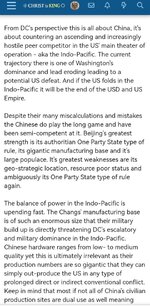
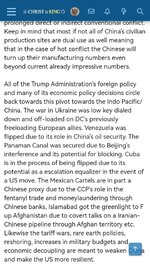
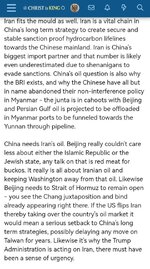

Very strange, below is how I see it. Although I have seen several posts from other posters with similar issues recently. It's something for the mods to address
Fixed Your original post.
Is there a chance that You clicked on something by accident? It happens sometimes, especially when posting from the phone.
Site was offline/ unreachable for several hours for me, maintenance work or did others not experience the same?
The same, it was unavailable to me for a couple of hours until I disconnected my VPN, then I could access.Site was offline/ unreachable for several hours for me, maintenance work or did others not experience the same?

Site was offline/ unreachable for several hours for me, maintenance work or did others not experience the same?
The same, it was unavailable to me for a couple of hours until I disconnected my VPN, then I could access.
I had the issue as well. It resolved on its own.
Resolved

Apologies for the outage this morning. There was an issue with the registrar (no, the domain did not expire).
The issue has been corrected and I do not anticipate any further problems. I hope everyone has a pleasant day.
Take care & God bless.
In Christ,
SoC
The issue has been corrected and I do not anticipate any further problems. I hope everyone has a pleasant day.
Take care & God bless.
In Christ,
SoC
- Servant of Christ
- Replies: 5
- Forum: News & Events
